
Works from QuickBooks transactions
Use the vendor or customer, project, reference number, amount, and date information your team already records—without a parallel payment system or data migration.
Collect waivers when you pay subs. Send yours when you get paid. EazyWaiver keeps the workflow connected to QuickBooks Online.

Card required · Initial waiver setup included · Most initial setups are completed within 1–2 business days after we receive usable DOCX forms · Your 14-day free trial starts only after your waiver setup is ready for review

Collect: I paid them and need a waiver back—use applicable QuickBooks Bills and Bill Payments. Send: They are paying me and I need to give them a waiver—use applicable Invoices and Customer Payments.
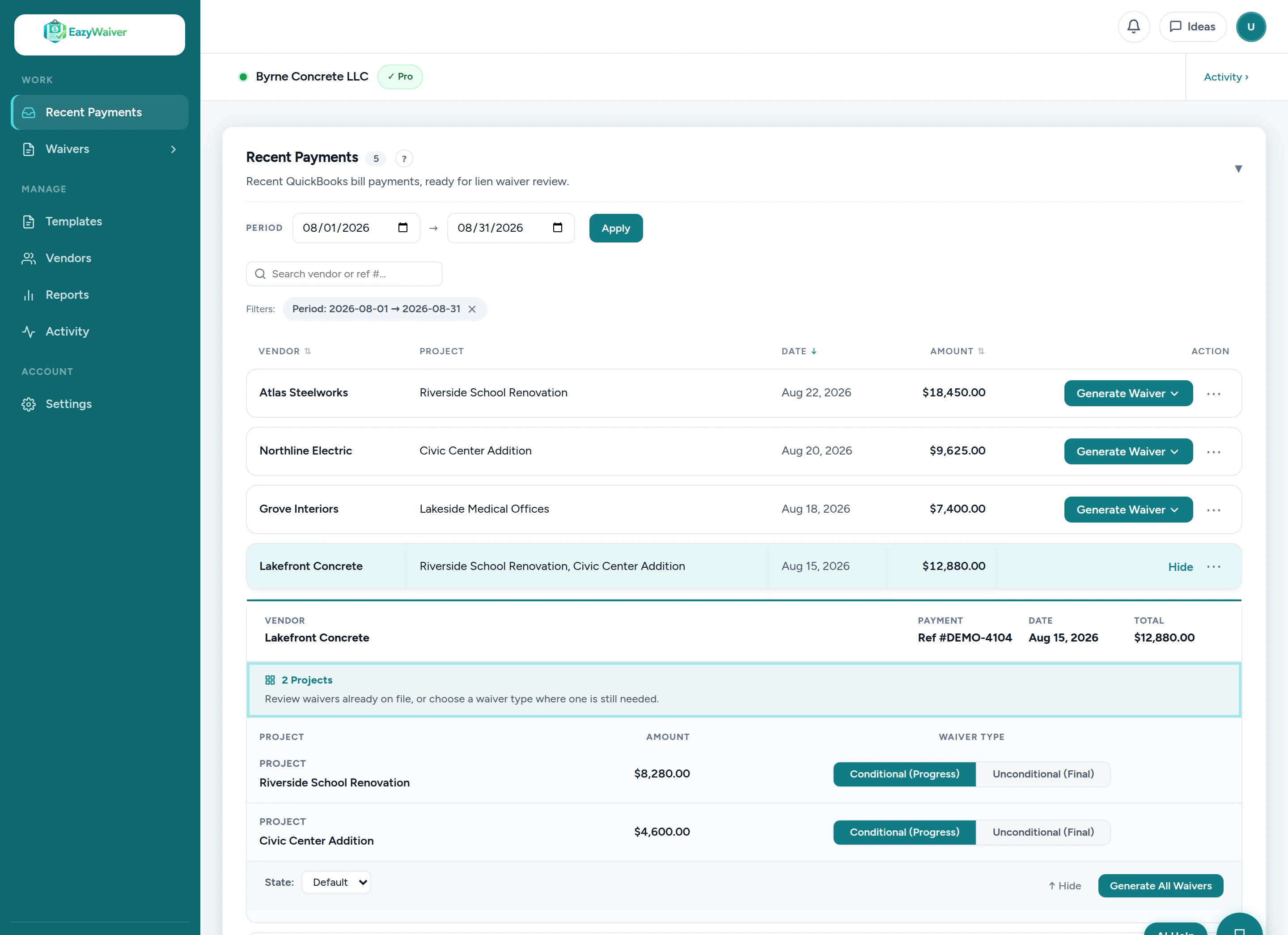
Watch a user select applicable QuickBooks information, choose a customer-approved waiver setup, review the generated PDF, send it for signature, and track the completed record.
– Still copying payment details out of QuickBooks to create lien waivers? EazyWaiver eliminates that work.
– We built EazyWaiver after dealing with this exact workflow in my own construction company. The idea was simple: keep QuickBooks, automate the waiver management.
– Find the QuickBooks payment, choose the company-approved Conditional Progress, Unconditional Progress, Conditional Final, or Unconditional Final waiver for each project, and generate it from your approved setup.
– Review the generated waiver and payment details before anything goes out, then send it for signature.
– The vendor receives a secure signing link and can review and sign without creating an account.
– Track what’s Drafted, Sent, Overdue, Signed, or already back in QuickBooks from one workspace.
– EazyWaiver is built for construction teams that already use QuickBooks. If lien waivers are still a manual AP task for your team, start your 14-day trial and see how much simpler the process can be.
Connect QuickBooks Online, add your approved waiver setup, confirm payment and project context, choose the form, then generate, send, e-sign, track, and keep the completed waiver with the related QuickBooks workflow.
Provide your company-approved waiver forms, and EazyWaiver organizes them for your QuickBooks-connected workflow. Support Conditional Progress, Unconditional Progress, Conditional Final, and Unconditional Final forms. If the same waiver setup applies to multiple states, you can explicitly use that setup across those states; if different approved documents are needed, a separate waiver setup can be added.
Choose an applicable transaction and EazyWaiver carries available company, project, reference number, amount, and date information into your customer-approved Conditional Progress, Unconditional Progress, Conditional Final, or Unconditional Final waiver form. Review the PDF before anything is sent.

Send the waiver for signature from EazyWaiver. The recipient opens a secure link on any device, reviews the document, and signs electronically or uploads a signed copy.

Follow each waiver from draft through signature and upload. When the completed PDF is ready, keep it attached to the related QuickBooks transaction where supported.

EazyWaiver is built for construction teams that already manage payments in QuickBooks Online. Add the waiver workflow you need without moving payments into a larger construction payment or compliance platform.
Use the vendor or customer, project, reference number, amount, and date information your team already records—without a parallel payment system or data migration.
EazyWaiver fills the forms your company provides. It does not write, replace, or make legal decisions about your waiver language.
Your initial waiver setup is included. Starter includes up to 20 waivers, Core includes up to 50, and Pro includes unlimited waivers per subscription period.
Generate waivers as payments go out, send signing links to subcontractors, and see what is signed or still needs follow-up before release or closeout.
Explore EazyWaiver for contractors →The construction company owns the workspace and can invite internal staff or an outside bookkeeper or accounting partner. Everyone the company authorizes can share visibility into the waiver workflow, while the company retains control of its QuickBooks connection, templates, records, billing, and access.
Explore EazyWaiver for bookkeepers →EazyWaiver began inside our own construction company after years of retyping QuickBooks transaction details into waiver forms and chasing signed PDFs through email. The product was built to keep that workflow connected from payment through completed record.
Questions about setup? Book a Demo →Upload usable DOCX versions of the Conditional Progress, Unconditional Progress, Conditional Final, and Unconditional Final waiver forms your company has approved. Most initial setups are completed within 1–2 business days after we receive the usable forms, and your protected 14-day trial starts only when the prepared setup is released for review.
Initial waiver setup is included. Choose a plan with the waiver volume and team controls your company needs.
For smaller contractors with lighter monthly waiver volume.
For contractors with consistent monthly waiver activity.
For teams that need unlimited waivers, approvals, and reporting.
Additional users are $24.99/month each · Purchase an additional 10 waivers for $29 when needed · Card required · No long-term contract · 14-day free trial
Not sure which plan fits? Book a Demo
Each construction company owns its workspace and can invite internal staff or an outside bookkeeper or accounting partner for shared waiver visibility. The company retains control of billing, the QuickBooks connection, templates, records, and access. Bookkeepers and accounting firms collaborate inside company-owned workspaces or may explore the Partner Program; they are not positioned as owning a separate subscription for every client.
Yes. EazyWaiver is built specifically for QuickBooks Online. It securely connects to your QuickBooks account, reads the transaction details needed for your waivers, and can attach completed waiver PDFs back to the related transaction where supported.
Yes. EazyWaiver uses the company-approved DOCX forms you provide. Your forms should be reviewed by your legal counsel for your company’s projects and requirements.
No. EazyWaiver organizes customer-approved waiver setups. It does not provide legal advice, determine legal sufficiency, or choose the legally appropriate form for a project or state.
Your initial waiver setup is included. Most initial setups are completed within 1–2 business days after we receive usable DOCX forms.
Yes. Recipients can open a secure link, review the waiver, and sign electronically or upload a signed copy without creating an EazyWaiver account.
Yes. A construction company can invite an outside bookkeeper or accounting partner into its company-owned workspace. Authorized collaborators share visibility into the waiver workflow, while the company retains control of its QuickBooks connection, templates, records, billing, and access.
Start with your company-approved waiver setup and the QuickBooks workflow your team already uses.